

Rising fuel prices, hectic schedules and incessant climate change warnings are making us more aware of the hidden costs of 'same room' meetings. Whilst telephone conferences alleviate the need for travel, a lack of visual feedback leaves such exchanges feeling one dimensional and disjointed. Up till now video conference choices have either been too costly or rudimentary to be viable business solutions. In an effort to change this, Melbourne-based AttendAnywhere have partnered with Vidyo to offer an affordable, on-demand, high-quality video conferencing solution.
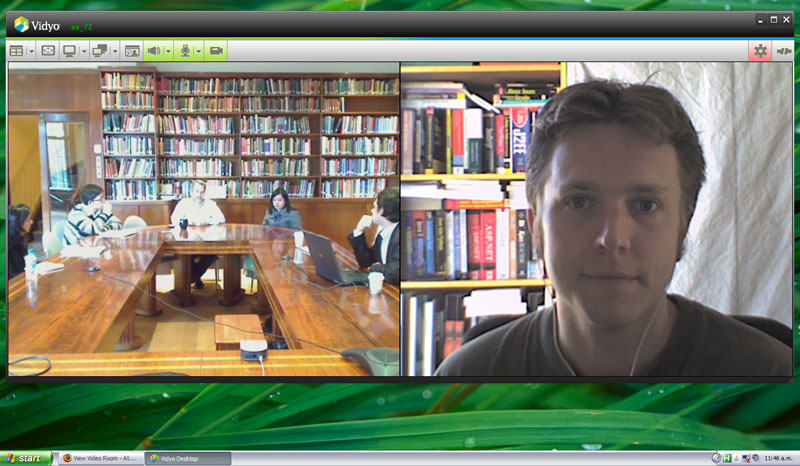
That's me (on the right) taking part in a video conference. (click to enlarge)
Yes that is a .Net book in the background - I was young, naive and she promised to be gentle...
But what is wrong with Skype?
At this point many people start to wonder why you would want to spend money on video conferencing when Skype video is free. The AttendAnywhere/Vidyo combination provides a range of advantages over plain old Skype:
- Multi-party conferences - Skype is limited to one on one video.
- Screen sharing of applications - Is possible in Skype but requires third-party software.
- Very low-latency audio - Ever tried having a conversation on Skype only to talk over people? Vidyo has pretty much solved this problem.
- High quality, robust calls - Skype video works, but is not that consistent as far as video or audio quality goes. Vidyo dynamically degrades the video and audio quality to make sure the conversation can still keep going.
- Meeting management - Skype lets you make calls but it does not help when it comes to setting them up.
- Ad-hoc meetings - With Skype you really need to be 'friends' with someone to start a meeting. In a business environment where you could be meeting with hundreds of relative strangers this is unwieldy.
- Support - Skype is a subsidiary of eBay focused on mainstream audio services. AttendAnywhere is dedicated to business to business video conferencing.